How Does Norton InQuizitive Work? A Complete Walkthrough
A question loads. You answer it. The next one feels harder, or easier, and nothing explains why. A number climbs somewhere you can't see, toward a target your instructor picked. Here's every gear turning underneath.

What InQuizitive is
InQuizitive is an adaptive quizzing tool published by W. W. Norton & Company and bundled with Norton textbooks. It is not a learning management system and it is not an exam engine. It's low-stakes practice, tied to the reading, that reports a score to your instructor.
The distinction matters more than it sounds. Because InQuizitive is formative practice rather than assessment, it has no proctoring, no lockdown browser and no time limit. It does, however, have a scoring system designed to reward certainty, which is where most students lose their evenings.
It runs in a normal browser on a computer, tablet or phone. Each Norton title has its own InQuizitive course tailored to that book, so what you're assigned depends entirely on which textbook your course adopted.
How you get into it
Two routes, depending on your course setup.
If your course is integrated with your campus LMS, whether that's Blackboard, Moodle, Canvas or similar, you launch InQuizitive from inside it and your grade reports back automatically. Nothing else to configure.
If it isn't, your instructor gives you a Student Set ID, which you enter the first time you open an activity so your score is attached to the right course. You can also enter it later from the account menu. If your instructor isn't grading InQuizitive at all, you don't need one.
Access itself comes from a registration code (which ships free with new copies of select Norton textbooks), from buying access directly, or from an ebook purchase that includes it. There's also a three-week trial before you need any of those: the full breakdown is in InQuizitive access codes explained.
The adaptive engine
This is the part worth understanding.
InQuizitive adjusts to your performance in real time. Answer correctly and it gives you harder questions. Answer wrong and it gives you easier ones. It also weights toward the learning objectives you're struggling with most, so if you keep missing questions about, say, the commerce clause, you'll see more of them.
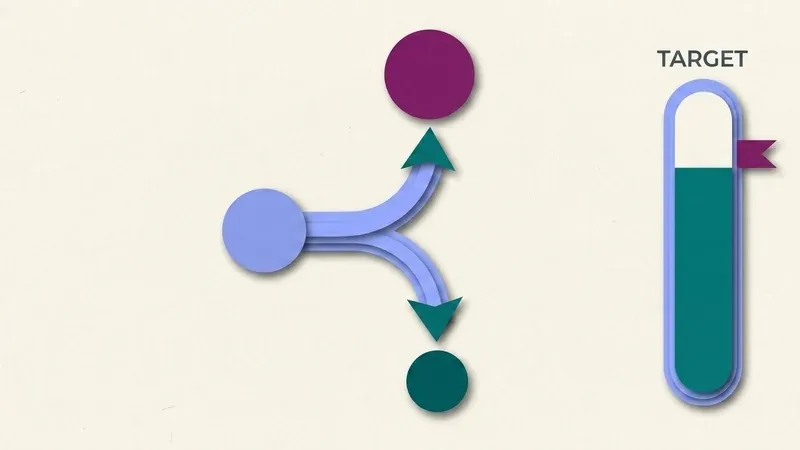
There are three difficulty levels, reached by accumulating points. Two consequences follow from that:
- Harder questions are worth more progress toward your target, so a strong run compounds.
- Once you reach Level 2 or 3, your point total can never fall back below that level's threshold. Progress ratchets. You can't lose an evening's work to one bad stretch.
The catch is the inverse: a run of wrong answers drops you into easier, lower-value questions, so the target recedes exactly when you most need it to arrive. Struggling is self-reinforcing in a way that costs time, not points.
InQuizitive doesn't punish a wrong answer by docking your grade. It punishes it by handing you more questions to earn back the same ground.
A worked example: one question, two outcomes
Say you're at 420 points in a 1,000-point activity, riding a four-question streak, and the next question is one you're unsure about.
Hedge it. Slider at 20, you guess wrong, lose those 20 points, and only refund half, 10, on the retry. You drop to 410, and the streak resets, taking the five-in-a-row bonus with it.
Know it. Slider at 100, correct on the first try. You bank the full 100, the streak hits five, and the hot-streak bonus adds 50 more, 5% of the target. One question just moved you from 420 to 570, a 150-point swing against the hedge.
Same question, same target. The only variable was whether you knew the answer before the slider moved.
Every question type you'll meet
Norton's own description is that all InQuizitive questions are interactive in one way or another: you drag and drop, you find and click something, or you type. In practice, that breaks down into five formats.
Multiple choice
The most common format across most assignments.
Drag-and-drop
Sorting items into categories, ordering a sequence, placing labels.
Click-on-target
Clicking a choice, a region of an image or map, or a specific span of a sentence.
Labeling
Diagrams, figures, maps.
Fill-in-the-blank
A typed response.
Which of these dominates depends on your course. History courses lean heavily on maps, images and primary-source excerpts. The writing modules are full of click-the-part-of-the-sentence questions. Biology and psychology courses are diagram-heavy.
Why this list matters
Every one of these formats is visual or positional, not just textual. That's the practical reason transcribed answer lists are so useless for InQuizitive: you can't write down "click the third clause of that sentence" in a flashcard deck in any usable way.
Feedback: there's no way out of a question
InQuizitive gives you immediate feedback after every click, drag or keystroke, and it corrects you as soon as you start down a wrong path, before you've committed to a misunderstanding.
Crucially, there is no "I give up" and no "show me the answer" button. You can't skip. The system guides you toward the correct answer through feedback instead. This is a deliberate pedagogical choice, and it's also why an activity can feel unskippable when you're stuck.
The Target Score decides when you're done
Your instructor sets a Target Score. Your grade is simply the percentage of it you've accumulated: 500 points against a 1,000 target is 50%.
Each question is worth 20 to 100 points, depending on where you set the confidence slider before answering. Get one wrong on the first attempt and you lose points; answer correctly on the second attempt and you regain half of what you lost.
There's also a hot-streak bonus: five correct in a row earns a bonus equal to 5% of the Target Score. On a 1,000-point target, that's 50 points for free, and it's repeatable.
The activity ends when you reach the target, or at the "Grades Accepted Until" deadline your instructor set, whichever comes first. A green checkmark confirms your grade has been submitted. There's a line graph tracking your Activity Score as you go.
The full arithmetic is in how InQuizitive is graded, and the slider gets its own treatment in the confidence slider explained. It's the single highest-leverage thing to understand.
The Take a Break screen
Get five questions wrong in a row and InQuizitive interrupts you with a Take a Break screen. It offers three things: the ebook, your activity report, or going back to the questions.
That's not a punishment, it's a nudge back to the reading, and it's a strong hint about what the tool expects. Norton links the textbook directly into the activity, which is why consulting your textbook while you work isn't cheating.
What it doesn't do
Since students ask constantly: InQuizitive is not proctored. No webcam, no lockdown browser, no screen recording, nothing describing tab or focus monitoring. It's an ordinary web page in an ordinary browser tab.
Your instructor sees your score, and can view activity reports. We cover the boundaries in does InQuizitive detect cheating and does InQuizitive track your tabs.
What to do with all this
Three practical conclusions.
First, the target is the finish line, not the question bank. You don't have to answer everything.
Second, certainty is the currency. A confident correct answer is worth up to five hedged ones, and streaks pay a bonus on top. Hedging isn't safe, it's slow.
Third, the fastest route is knowing the answer, which is either doing the reading or having something read the question for you. QuizSparrow does the second: it reads whatever InQuizitive has put on your screen and gives you an answer plus the reasoning, so the slider goes to 100 with justification.
Frequently Asked Questions
Does InQuizitive actually get harder if I'm doing well?
Yes. Correct answers push the difficulty up, wrong answers pull it down, and once you hit Level 2 or 3 your points can't drop back below that threshold, so a strong run compounds.
Can I skip a question I don't know the answer to?
No. There's no "I give up" or "show me the answer" button. A wrong attempt gets corrective feedback instead, and five wrong answers in a row trigger the Take a Break screen rather than a skip.
Is InQuizitive proctored?
No. No webcam, no lockdown browser, no documented tab or focus monitoring. It's an ordinary browser tab, though your instructor can still see your score and activity reports.
How is my InQuizitive grade actually calculated?
It's the percentage of the Target Score you've banked. Each question is worth 20 to 100 points based on your confidence slider, a wrong attempt only refunds half on retry, and a five-question streak earns a bonus worth 5% of the target.
What happens when I hit the Take a Break screen?
Five wrong answers in a row triggers it, offering the ebook, your activity report, or returning to the questions: a nudge toward the reading, not a penalty.