The Best InQuizitive Answer Tools in 2026 (Honest Comparison)
Extensions that click but don't know the answer. Flashcard decks for a different edition. A chat window you have to feed by hand. Four categories surface when you search for InQuizitive help, and only one reads your actual question.

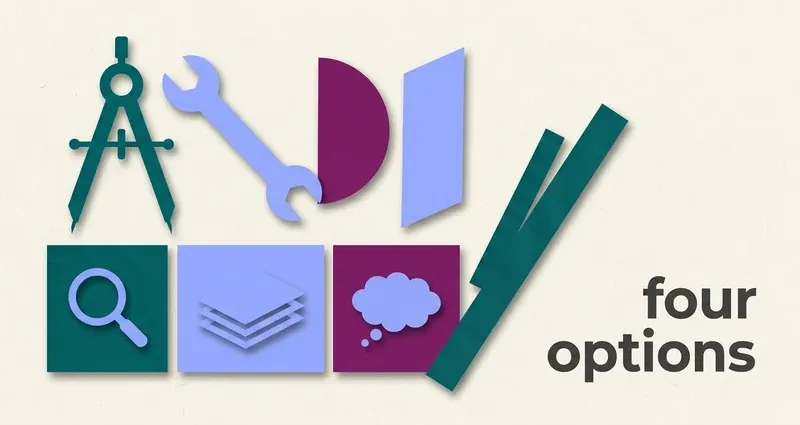
Four categories, and only two of them help
The options split cleanly, and knowing which category you're looking at saves a lot of disappointment.
Automation extensions
Speed up the clicking. Don't know the answers.
Flashcard and answer-dump sites
Someone else's transcription, usually of a different edition.
General AI chat tools
Capable, but you have to do all the transcription work by hand.
Answer extensions
Read the question you actually have, on your screen, in your course.
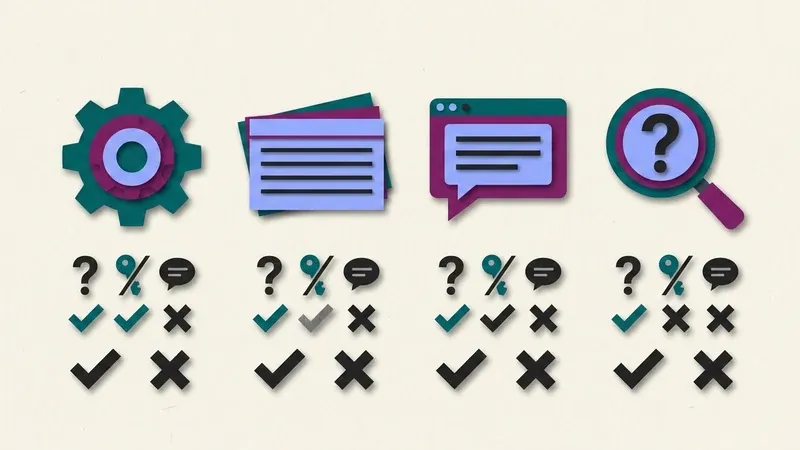
Line them up against three questions, does it read your question, does it need an answer key first, does it give you reasoning, and the picture clarifies fast. Let's take them in turn, then the honest disclosure.
1. Automation extensions
What they are: browser extensions that click through an InQuizitive activity for you. Feature lists typically include auto-advancing past completion screens, skipping break intervals, a dark mode, background operation, pacing controls and randomised completion timestamps.
The one on most people's lists is UnInquizitive, which promises to finish activities "in minutes, not hours" by automating the repetitive clicking. Its pricing, as of writing, is a free tier with 3 runs, a $20 tier for 30 days with 15 runs/month, and a $40 tier for 30 days with unlimited runs.
What to understand before you buy: its own site states plainly, "No answer keys, just faster workflow." That's admirably honest, and it's the crux. These tools speed up the clicking; they do not know what to click.
That matters more on InQuizitive than it would elsewhere, because of how the scoring works. A wrong first answer costs points you can only half recover. Wrong answers also make the engine feed you easier questions worth fewer points, and after five wrong in a row you get the Take a Break screen. So automated guessing loses points at the same rate as manual guessing, it's just that the losses arrive faster. The activity can genuinely take longer.
Clicking faster while you're still guessing doesn't finish an activity sooner. It just gets you to the same lost points on a shorter clock.
The pacing and timestamp features are worth a second look too. They exist to make your session look organically slow, defending against timing surveillance. InQuizitive isn't proctored: no webcam, no lockdown browser, and nothing in Norton's documentation describing timing or tab monitoring. So those features are spending your time on a threat that isn't there.
Verdict: genuinely useful if clicking is your bottleneck, say you already know the material cold and resent the interface. Useless if the bottleneck is not knowing the answers, which for most people it is.
2. Flashcard and answer-dump sites
What they are: Quizlet decks, Course Hero and CourseSidekick uploads, PDF "answer keys," and forum threads. Someone transcribed some InQuizitive questions and posted them.
Why they mostly fail here, and it's structural rather than a matter of finding a better deck:
- Every Norton title has its own InQuizitive course. Dozens of titles, each with editions. The deck you find is usually from a different book or a different edition, with drifted wording and reordered options.
- The course is much larger than your session. A single course can carry well over a thousand questions, and you'll see a fraction, chosen adaptively.
- The sequence is adaptive. Two students in the same course on the same night see different questions in a different order, so there's no "chapter 8 in order" to follow.
- Half the question types can't be transcribed. Click the region of this map, drag these into order, click the broken clause of this sentence: none of that survives as text on a card.
We go into this at length in InQuizitive answers: why there's no answer key.
Verdict: occasionally lucky on a pure-text multiple-choice question. Unreliable enough that matching against a deck is often slower than reading the question, and wrong often enough to cost you points you only half get back.
3. General AI chat tools
What they are: ChatGPT, Claude, Gemini and the rest, used by hand. You read the question, type or screenshot it into a chat window, read the answer, come back.
Where they're good: genuinely strong on explanation. If you want a concept unpacked rather than a question answered, this is the best option on the list, and it's the one your instructor is likeliest to consider legitimate.
Where they fall down on InQuizitive specifically: the transcription tax. Every question means a context switch, and the visual question types, labeling a diagram, clicking the region of a map, clicking the span of a sentence, are laborious to convey and easy to garble. Doing that across the forty-odd questions a hedged session takes is slower than just answering them.
Verdict: excellent study partner, poor activity workflow. Use it for the concept you keep missing, not for the activity.
4. Answer extensions, including ours
What they are: extensions that read the InQuizitive question rendered on your screen and surface an answer inline.
This is the category QuizSparrow is in, so treat the rest of this section as interested rather than neutral. Here's what we'd want you to weigh.
The structural advantage is that reading your question sidesteps the edition-matching problem entirely. It works on your course by construction, whichever Norton title you were assigned, and it handles the visual question types that neither a flashcard deck nor a chat window can: the maps, the diagram labels, the sentence spans.
The thing that makes it work with the scoring is the reasoning attached to each suggestion. That's not a courtesy feature. The whole scoring problem is that a hedged correct answer earns 20 points where a confident one earns 100, and you can only hedge your way to a target slowly. A suggestion you can justify is what lets you push the slider to 100. A bare letter doesn't.
What it isn't: an answer key, a way around monitoring (there is none), or a substitute for understanding. Nothing that reads a question is right every time, and a wrong first answer costs you real points, so read the reasoning rather than clicking on autopilot.
Pricing, for comparison with the automation tier above: from $8.33/month on the yearly plan, with weekly and monthly options, nothing metered and no run quotas, cancel anytime. The direct comparison with UnInquizitive is on the UnInquizitive alternative page.
Red flags when you're picking a tool
Watch for these before you buy
- "Unlimited answers" with no mention of your course or edition. That's usually a flashcard deck in a nicer wrapper.
- Marketing built around evasion or "undetectable" claims. InQuizitive genuinely isn't proctored, so that's selling protection from a threat you don't have.
- No free look at how it actually handles a question. Anything worth paying for should be willing to show you, not just tell you.
How to pick
- You know the material and just hate the clicking? An automation tool is a rational purchase.
- You want to understand one concept properly? A general AI chat tool, or honestly the ebook Norton linked into the activity.
- You're losing hours because you don't know the answers? That's the answer-extension category, and it's what we built.
- You have time to read the chapter? Do that. It's still the fastest route, and it's free. See how to finish an activity faster for why.
Whatever you pick, your instructor's course policy governs your course. Read it, it outranks every comparison on this page.
Frequently Asked Questions
Is there an InQuizitive answer key any of these tools are secretly using?
No. Every Norton title has its own course, the question bank is far bigger than any one session, and the questions are served adaptively, so there was never a single shared list to draw from. See why there's no answer key for the full mechanics.
Are automation extensions and answer extensions the same thing?
No. Automation extensions click through the activity faster but don't know what to click, so a wrong guess still costs you the same points, just sooner. Answer extensions read the actual question on your screen and suggest a response with reasoning, which is what lets you raise the confidence slider instead of hedging.
Is it risky to use an InQuizitive extension since it isn't proctored?
There's no monitoring to evade in the first place. InQuizitive has no webcam requirement, no lockdown browser, and nothing in Norton's documentation about tracking tabs or timing, so "undetectable" marketing is selling protection against a threat that doesn't exist.
What's the actual cost difference between the categories?
Flashcard sites and chat tools are often free but cost you transcription time. Automation extensions run up to around $40 for a month of unlimited runs. Answer extensions like QuizSparrow start around $8.33/month with no run quotas.